Tuesday, 29 November 2016

WHPS Fundraising Message...

Hello Parents!!  
 
Just a quick reminder that this Wednesday, November 30 is the last day to get your orders in for our Purdy's fundraiser.  These are great ideas for Christmas presents and stocking stuffers.  Orders will be ready for pick up at the school on Friday, December 16.
 
Also, our Fundscrip gift card fundraising is still ongoing.  We will be running this fundraiser throughout the year, and there is a large number of stores and online vendors to choose from.  If you need gift cards for any reason, its a great way to support our fundraiser while getting what you need at the same time.  
 
The WHPS Fundraising Society would like to thank all parents that have contribute to our fundraising efforts.  We realize that there have been numerous fundraisers since the beginning of the school year.  While we do appreciate everyone's efforts a great deal, please know that these fundraisers all have a very important cause.  Over the summer, our society partnered with the school, the City of Leduc, and Black Gold School Division to build the two amazing playgrounds that our children and community  have use of.  As a result, the society has a significant financial obligation to repay.  We are working very hard to raise money for this reason, and again, we thank you for your support and fundraising efforts.
 
Kind Regards, 
 
WHPS Fundraising Society

Friday, 25 November 2016

Week in Review: November 21 - 25

As we get ever closer to the close of another month, I look back at what we have accomplished so far and find myself smiling.  We have covered a healthy amount of "ground" and are moving along nicely into new territory.  This week there were plenty of challenges and opportunities to dazzle with new skills. In Math we began the next progression of multiplication, our Science went full hands-on, we added a few more games to our LA program, and Art class was suddenly a mix of Health, Social Studies and Art all in one as we tied in our study of Native Alberta culture and native artist Mark Jacobson.  


And now onto the curricular goings on...

In Math we have begun the transition from basic single digit multiplication to multi-digit equations.  As I explained to the kids it is very much the same process when viewed as simply as series of connected single digit problems versus a "scary" large number.  As a means of providing at home practice the students have access to a shared document on their Google Drive accounts listing a series of websites that can offer some continued at-home practice via fun games.  Always easier to work on concept retention when the activities are entertaining - gets students learning when they don't even realize it.

Here are a couple double digit multiplication example sites:

BIG NUMBER BOARD GAME

JEOPARDY

In Language Arts this week we have been really focusing on improving our reading fluency.  Many of the activities we did this week worked on identifying initial and ending sounds in words.  These phonic word attack skills are useful in helping decode words while reading.  If students are able to identify the sounds they hear within an unknown word, the better their ability to then incorporate other reading strategies such as syllables and blending.  Continue to work with the home reading.  Whether you choose to record the reading or not is entirely up to you, but the continuous exposure to reading text allows for the development and fine tuning of reading skills.

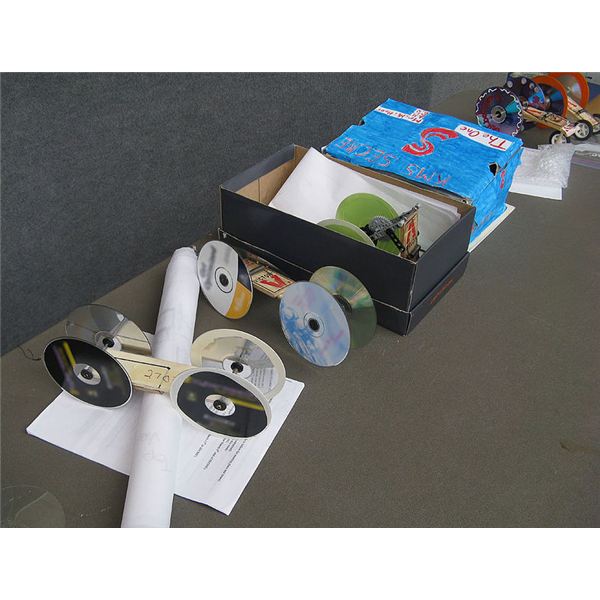
In Science our study of Simple Machines continues.  This week we have been examining the wheel and axle.  As an extension to our in-class activities we will constructing individual "cereal box" racers.  The racers will allow us to apply our knowledge of wheel and axle placement and see first hand how different placements create differing levels of motion.  If you have not a chance yet to send in any of "building materials" please try and send some come Monday, especially 4 items that can be used as whee for their box racers.

Our Social Studies this week has been largely incorporated into our week's Art lessons, in that our study of Alberta's beginning native cultures has allowed for a smooth transition into our first artist study of the year, Mark Jacobson.  More information on our studied artist can be found here: http://markanthonyjacobson.blogspot.ca/

Upcoming Important Dates/Events

Tues., November 29th - Parent Conferences 3:45 –6:00 / 6:15—8:00 (last appt. at 7:45pm)
Thursday, December 1st - Parent Conferences 3:45 - 6:00 (last appt. at 5:45pm)
Friday, December 2 - PD Day: No School
Wednesday, December 7 - Early Dismissal @ 2:30PM


Monday, 21 November 2016

Microwave News

A message from parent Council...

Good morning,

After a month of providing Microwave Day on both Monday and Tuesday, we have found that there isn't the demand to accomodate two days, therefore, effective immediately, we will only be microwaving on Mondays.

WHPS School Council

Saturday, 19 November 2016

Week in Review: November 14 - 18


Figure it was just a matter of time before our luck with the weather changed and the temperatures began their gradual (or not so gradual) descent into winter.  Fortunately for us the snow hasn't really arrived yet - and we were all staying warm working away in class!

This week was  another good one and we managed to knock a few more things off our grade four to-do list!  It was a fun week filled with plenty of group work, some more new concepts introduced, a few review activities, some testing, and a few more learning projects wrapped up and are on display.


And now the curricular info...

In Math we continued to work with multiplication and gaining that much needed fact recall and fluency with solutions up to 100. These basic facts are what form the basis for the next more challenging concepts involving multiple digits which we will be introducing in the next couple weeks prior to the Christmas break.  


In advance of everyone tackling problems involving double digit numbers being multiplied by single digit numbers, i.e. 76 x 7, it is important that students have a good working knowledge of facts.   All students have access to a shared "multiplication links" document on their Google drive accounts - I strongly encourage that the kids visit this document a few times a week to either gain or maintain fluency with equations.


With our next progression in multiplication, problems involving multiple digit equations, the problems will work with basic facts recall in multiplication but also build on the regrouping addition type problems from our previous unit - in that numbers are carried forward and then added to the next columns total.


In Language Arts this week our main focus was on parts of speech, specifically nouns, pronouns, verbs, adjectives, and adverbs.  Throughout the week the kids were working on being able to identify these different features within example sentences, and then writing their own sentences that would mirror what they had seen in the examples.  We currently have a wide range of understandings so this topic will continue to be incorporated through language program.


In Science this week we continued our study of Simple Machines and begin comparing and contrasting wheels and rollers, and how each machine is similar in that they are designed to make work easier.  In discussion with the kids, the students were surprised by the many uses of wheels beyond simply "cars".  

Beginning next week Monday our learning becomes even more hands on with numerous building projects being planned - cereal box racer, shoe box catapult, etc..  I will be asking the students to bring in "construction materials" for use during our Science classes.  The materials are most commonly recyclables and nothing to fancy. 


Here is a list of some "building" supplies that would definitely help your child to have in the classroom during their construction periods.  Don't worry if you don't have every item, the hope is that folks will send in extras and we can shift the materials around as needed. Any or all of these materials can be sent with your child beginning on Monday (Nov.21):


Building supplies:
aluminum foil
toothpicks
plastic spoons
wooden spoons
craft/popsicle sticks
wood dowels
straws
hot glue sticks
old CDs (make great wheels)
aluminum POP cans
From The Recycling Bin
shoe box (if you have extra please send)
cereal box (if you have extra please send)
paper towels rolls
magazines
egg cartons
milk cartons
clean cans & jars
small plastic containers
styrofoam trays
plastic lids 

Project Bling:
glitter
pom poms
feathers
cotton balls
googly eyes
craft foam
sequins
Papers:
copy paper
construction paper
tag board/card stock
wax paper
colored tissue paper
coffee filters
brown paper bags/lunch bags
newspaper
crepe paper

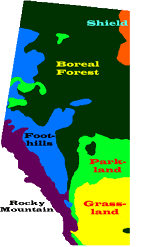
In Social Studies we wrapped up the last of our student "Alberta Regions" Projects.  Thank you parents for your assistance in guiding your child's projects.   The projects were a great reinforcement of the materials we were covering in class, and served as great review tools for the students in terms of getting ready for next week's unit one quiz related to the six geographic regions.


Parent-Teacher Conferences/Term 1 Report Cards

As I had sent out earlier this week report cards for Term 1 will go home on Friday, November 25, and parent conferences will be held the following week on Tuesday, November 29th, 3:45 –6:00 p.m. and 6:15—8:00 p.m (i.e. last conference at 7:45p.m.). and on Thursday, December 1st, 3:45 - 6:00 p.m. 


Conference times for all students will be arranged on-line only starting on Monday, November 21st.

All Parent/Teacher conference scheduling will be arranged through 
School Appointments - http://whps.schoolappointments.com

Registration Instructions for Parent/Teacher Conference 
As per the information shared in this month's school newsletter here is the procedure for registering and booking your upcoming parent-teacher conference.  Parents click on the “Register” tab and fill in the registration form to create an account. Once parents have successfully registered, they can log-in to the system and then must register their students by name. 

To Book Appointments Select Teachers Parents can schedule appointments for any student that they have added to the system by clicking on the “Appointments” button beside the student’s name. The parent is then taken to a page where they can select the teachers with whom they wish to meet. Multiple teachers can be selected by using the “Ctrl” key on a PC keyboard or the “Command” key on a Macintosh keyboard. 

Teacher Appointment Calendars   Parents are shown the calendars of the selected teachers. It also shows them appointment times that are unavailable for booking. Parents can select appointment times by simply clicking the check boxes or by clicking in the time block beside the check box. Once an appointment time has been selected it will change to green. If no appointments are available, click on the call back button at the top of the list. It is not possible for parents to select more than one appointment at the same time or to select more than one appointment with the same teacher.  Javascript enabled browsers are required for validation on the screen. 

Appointments Booked Successfully   Once the appointments are booked the screen will display the list of appointments for the student. When the parent clicks on the “Return to Home Page” button, they will return to the home page with their students and their appointments listed. They can book additional appointments, or they can book appointments for another student. 

Parents with More Than One Student   If a parent has more than one student at the school, the teacher appointment calendars will have an additional feature displayed when the second (or third, etc.) student bookings are made. If a sibling has an appointment booked, the student’s name will be displayed for a parent, thus making it easier to book adjacent appointments. 

Printing Parent Appointment Schedule   From the home page it is possible for you to generate a PDF document with the list of your appointments. By clicking on the “Print Appointments” button a window will pop-up asking the parent what they wish to do with the document.. In Internet Explorer, it is recommended that people click the “Save” button, save the file and then click “Open” to view the file. IE sometimes has a problem downloading and opening PDF documents that are generated from web sites. Click “Open” after the download is complete to view the PDF. Parent Schedule PDF The generated PDF will list the appointment times, the student and the teacher with whom the appointment is booked. 


If you have any further questions you may contact the school @ 780-986-5991. Thank you.

Important Upcoming Events/Dates

Monday, November 21 - Emily Carr Presentation (PM)
Monday, November 21 - Registration for Parent Conference bookings opens
Tuesday, November 22 - Social Studies Quiz
Wednesday, November 23 - Day 4 Library class: Please return library books today
Thursday, November 24 - Retro Bill Presentation (AM)
Friday, November 25 - Term 1 Report Cards sent home
Tues., November 29th - Parent Conferences 3:45 –6:00 / 6:15—8:00 (last appt. at 7:45pm)
Thurs., December 1st - Parent Conferences 3:45 - 6:00 (last appt. at 5:45pm)

Thursday, 17 November 2016

ADmazing Coupon Books!

Just a friendly reminder that Friday, November 18th is the last day to purchase your ADmazing Coupon Books.


Please have all money in by that morning so we can try and get your books out to you in the afternoon.  We have books available for both Edmonton and  Calgary.

Monday, 14 November 2016

Understanding MindUp Session


Sorry for the late notice...just received this and thought if anyone had time it would be an evening well spent.  The MindUp program is one which we are using here at West Haven to help our students develop mindfulness strategies that can assist with self regulating emotions.  With this evening's session parents and students will be able to tour through interactive stations where they can learn about both the physical and mental benefits of being mindful and the activities that go along with the Mind Up curriculum such as movement, senses, Coloring, Glitter jar 101, MindUp literature, etc... plus of course a mindful tasting table!

Here is some further info about the Mind Up program...

Saturday, 5 November 2016

Week in review: Oct. 31 - Nov. 4


My how the weeks just seem to be speeding by, one second we've just started and the next we are cruising into November already.  As with our previous weeks the learning was fast, furious, and of course fun.  We continued our core units of study in multiplication, the Regions of Alberta, and language skills involving increased phonemic awareness and breaking words into syllables as tools for improving the decoding of unknown words in reading.  This past week we also began work in our new Science unit involving the study of Simple Machines.  Our first few lessons related to the topic of friction and how simple machines like rollers can help reduce friction.  Rollers make "work" easier by reducing the amount "force" needed to overcome the friction and subsequently make completing the task easier.  

Next week we will be studying the themes of remembrance and what it means to be a hero in advance of Remembrance Day ceremonies being held on November 9th at 1:40PM here at the school.

And now onto the curricular stuff...

In Math the students continued to develop their fluency and accurate recall with multiplication equations involving facts 0 through 10.  This is definitely a skill that improves only through continued exposure to opportunities for repeated practice - the more they see the problems and the correct solution, the more likely they are to make the mental connections needed to commit the information to long term memory.  We will continue to get that needed practice here in class and additional practice at home will undoubtedly help solidify that needed base of basic facts so that we can continue increasing the challenge of more digits to the problems. All the kids have a shared document on their Google drives ("Multiplication Links") listing websites that will allow them a fun way to practice their computation skills.

In Language Arts, a quick reminder to everyone to keep up with the home reading.  Our individual student monthly goal is 400 minutes, which is roughly 15 minutes per night.  As of right now the entries into the reading logs have been sporadic for many students (and some I've yet to see).  Reading fluency and comprehension skills are important life skills that require practice so please encourage a few minutes of reading every night. The next draw date for the Oilers Home Reading program is mid November and it would be great if everyone reached their goal and we could enter the class into the draw!  

Congratulations to Sarah, who was our second home reading winner of the Laser City passes for the month of October.  The Laser City reading logs will continue to come home daily (green folders) provided they have been returned to the school.   I check them daily.


In Science we have jumped right into the study of Simple Machines.  Like I told the students this is very much a hands-on unit as we will be building and testing a variety of different gizmos in class to see how the simple machines within them help to make work easier.  Over the next few weeks we will be working with wheels and axles, gears, pulleys, levers (class 1, 2, and 3), inclined planes, wedges, and screws.  With the upcoming building projects I will be sending home a note next week listing some of the "construction materials" that can be wrangled out of the recycling bag and sent to class instead.

In Social Studies the individual project presentations have continued.  I have been really impressed with many of the projects and with the amount of information that is being presented.  Our final presentations will wrap up next week and then there will be a quick quiz based off of all the regional information that has been presented, i.e. what animals can be found in the Grasslands?  What are some land forms you would find in the Rocky Mountain region?  The class is aware there is a quiz about all the presentations so they have been good about keeping an attentive ear and eye on all the presenters.  As a guide to study have them go through their own presentations.  There will be regional questions relating to location within the province, unique land forms, animals and vegetation, natural resources, climate, communities located within each region and the types of recreational activities found within the regions.

Parent-Teacher Conferences/Term 1 Report Cards

As I had sent out earlier this week report cards for Term 1 will go home on Friday, November 25, and parent conferences will be held the following week on Tuesday, November 29th, 3:45 –6:00 p.m. and 6:15—8:00 p.m (i.e. last conference at 7:45p.m.). and on Thursday, December 1st, 3:45 - 6:00 p.m. 

Conference times for all students will be arranged on-line only starting on Monday, November 21st.

All Parent/Teacher conference scheduling will be arranged through School Appointmentshttp://whps.schoolappointments.com

Registration Instructions for Parent/Teacher Conference 
As per the information shared in this month's school newsletter here is the procedure for registering and booking your upcoming parent-teacher conference.  Parents click on the “Register” tab and fill in the registration form to create an account. Once parents have successfully registered, they can log-in to the system and then must register their students by name. 

To Book Appointments Select Teachers Parents can schedule appointments for any student that they have added to the system by clicking on the “Appointments” button beside the student’s name. The parent is then taken to a page where they can select the teachers with whom they wish to meet. Multiple teachers can be selected by using the “Ctrl” key on a PC keyboard or the “Command” key on a Macintosh keyboard. 

Teacher Appointment Calendars   Parents are shown the calendars of the selected teachers. It also shows them appointment times that are unavailable for booking. Parents can select appointment times by simply clicking the check boxes or by clicking in the time block beside the check box. Once an appointment time has been selected it will change to green. If no appointments are available, click on the call back button at the top of the list. It is not possible for parents to select more than one appointment at the same time or to select more than one appointment with the same teacher.  Javascript enabled browsers are required for validation on the screen. 

Appointments Booked Successfully   Once the appointments are booked the screen will display the list of appointments for the student. When the parent clicks on the “Return to Home Page” button, they will return to the home page with their students and their appointments listed. They can book additional appointments, or they can book appointments for another student. 

Parents with More Than One Student   If a parent has more than one student at the school, the teacher appointment calendars will have an additional feature displayed when the second (or third, etc.) student bookings are made. If a sibling has an appointment booked, the student’s name will be displayed for a parent, thus making it easier to book adjacent appointments. 

Printing Parent Appointment Schedule   From the home page it is possible for you to generate a PDF document with the list of your appointments. By clicking on the “Print Appointments” button a window will pop-up asking the parent what they wish to do with the document.. In Internet Explorer, it is recommended that people click the “Save” button, save the file and then click “Open” to view the file. IE sometimes has a problem downloading and opening PDF documents that are generated from web sites. Click “Open” after the download is complete to view the PDF. Parent Schedule PDF The generated PDF will list the appointment times, the student and the teacher with whom the appointment is booked. 

If you have any further questions you may contact the school @ 780-986-5991. Thank you.


Thank you!
A big thank you to all the families that were able to send in treats for the class Halloween party.  As you can see the treats were a big success!  Thank you again to the parent reps for coordinating.


Important Upcoming Events/Dates
Wednesday, November 9 - Remembrance Day Theme Day - Wear Red
Wednesday, November 9 - Remembrance Day Ceremony @ 1:40PM
Thursday, November 10 - Mid-Term Break: No School
Friday, November 11 - Remembrance Day: No School
Monday, November 14 - Spelling Test #10
Tuesday, November 15 - Social Studies Regions of Alberta Quiz


Thursday, 3 November 2016

Information Odds and Ends...

Just some quick information about a variety of topics that has popped up these last couple days...I am passing it along so as to ensure everyone is getting the information and staying in the proverbial "loop".


Hot Lunch Information
Just a quick reminder, if you have not already checked out how to order hot lunch items on-line, please go to: http://westhaven.hotlunches.net

Our school access code is: WHPS 

The program then guides you through entering your information. Our hot lunch is pre-ordered and prepaid, with strict deadlines and no exceptions. The monthly orders always open on the first of the month and close at midnight on the 15th.

Remembrance Day Ceremony
Our Remembrance Day Ceremony will take place on November 9th at 1:40 pm. We are fortunate to have the Canadian Legion and Knights of Columbus coming out to the school to lead our celebration. It is our privilege to observe and remind students of the sacrifices made in the name of freedom so that we can enjoy our life in Canada. In addition to our military, this includes our police and first responders. Our thoughts are with those families who have lost a family member in service to our country and/or community and those who continue to serve.

Our Remembrance Day Spirit Day will be held on Wednesday, November 9th - Wear RED for Remembrance Day

Scholastic Book Fair
 The Scholastic Book Fair will be coming to West Haven Public School Learning Commons in November. Students will be able to visit the Book Fair during their scheduled library times as well as morning recess and lunch time.  They will be able to purchase books/posters and all kinds of learning tools (pens, pencils, erasers, etc.) if they wish. 

We will also be open during parent/teacher interview evenings. The Book Fair will be open on the following days and times: 
Friday, Nov. 25/16 Recess (10:15 a.m.) Lunch Recess (12:00 p.m.) 
Monday, Nov. 28/16 Recess (10:15 a.m.) Lunch Recess (12:00 p.m.) 
Tuesday, Nov. 29/16 Recess (10:15 a.m.) Lunch Recess (12:00 p.m.) After School (3:15 - 8:00 p.m.) Wednesday, Nov. 30/16 Recess (10:15 a.m.) Lunch Recess (12:00 p.m.) 
Thursday, Dec. 1/16 Recess (10:15 a.m.) Lunch Recess (12:00 p.m.) After School (3:15 – 6:00 p.m.) 

Don’t forget to enter our Family Event Draw by having your child return the entry form to the Learning Commons. The entry will be attached to the Book Fair Flyers which will go home later this month. Your child could win $25 in books, as well as $25 in books for your child’s classroom. Hope to see you at the Book Fair!

Term 1 Report Cards & Parent Teacher 
Conference Information

Report Cards for Term 1 will go home on Friday, November 25, 2016.  

Parent conferences will be held on Tuesday, November 29th, 3:45 –6:00 p.m. and 6:15—8:00 p.m (i.e. last conference at 7:45p.m.). and on Thursday, December 1st, 3:45 - 6:00 p.m. 

Conference times for all students will be arranged on-line only starting on Monday, November 21st.

Parent/Teacher Conference Scheduling Site - http://whps.schoolappointments.com

Registration Instructions for Parent/Teacher Conference 
As per the information shared in this month's school newsletter here is the procedure for registering and booking your upcoming parent-teacher conference.  Parents click on the “Register” tab and fill in the registration form to create an account. Once parents have successfully registered, they can login to the system and then must register their students by name. 

To Book Appointments Select Teachers Parents can schedule appointments for any student that they have added to the system by clicking on the “Appointments” button beside the student’s name. The parent is then taken to a page where they can select the teachers with whom they wish to meet. Multiple teachers can be selected by using the “Ctrl” key on a PC keyboard or the “Command” key on a Macintosh keyboard. 

Teacher Appointment Calendars   Parents are shown the calendars of the selected teachers. It also shows them appointment times that are unavailable for booking. Parents can select appointment times by simply clicking the check boxes or by clicking in the time block beside the check box. Once an appointment time has been selected it will change to green. If no appointments are available, click on the call back button at the top of the list. It is not possible for parents to select more than one appointment at the same time or to select more than one appointment with the same teacher.  Javascript enabled browsers are required for validation on the screen. 

Appointments Booked Successfully   Once the appointments are booked the screen will display the list of appointments for the student. When the parent clicks on the “Return to Home Page” button, they will return to the home page with their students and their appointments listed. They can book additional appointments, or they can book appointments for another student. 

Parents with More Than One Student   If a parent has more than one student at the school, the teacher appointment calendars will have an additional feature displayed when the second (or third, etc.) student bookings are made. If a sibling has an appointment booked, the student’s name will be displayed for a parent, thus making it easier to book adjacent appointments. 

Printing Parent Appointment Schedule   From the home page it is possible for you to generate a PDF document with the list of your appointments. By clicking on the “Print Appointments” button a window will pop-up asking the parent what they wish to do with the document.. In Internet Explorer, it is recommended that people click the “Save” button, save the file and then click “Open” to view the file. IE sometimes has a problem downloading and opening PDF documents that are generated from web sites. Click “Open” after the download is complete to view the PDF. Parent Schedule PDF The generated PDF will list the appointment times, the student and the teacher with whom the appointment is booked. 

If you have any further questions you may contact the school @ 780-986-5991. Thank you.

Christmas Concert...yes already!
Save the Date! Students have begun preparing for the concert of the season! Our class will perform 2 shows on our performance day; a dress rehearsal (open to the public) in the afternoon, and a final evening show.  Our class is scheduled to perform on December 21st along with students in Kindergarten PM, Grade 2, 4, and 6.


Bake sale 
The next school wide bake sales are scheduled for November 9th and 23rd